Does Ross Accept Apple Pay at Checkout?
6 min read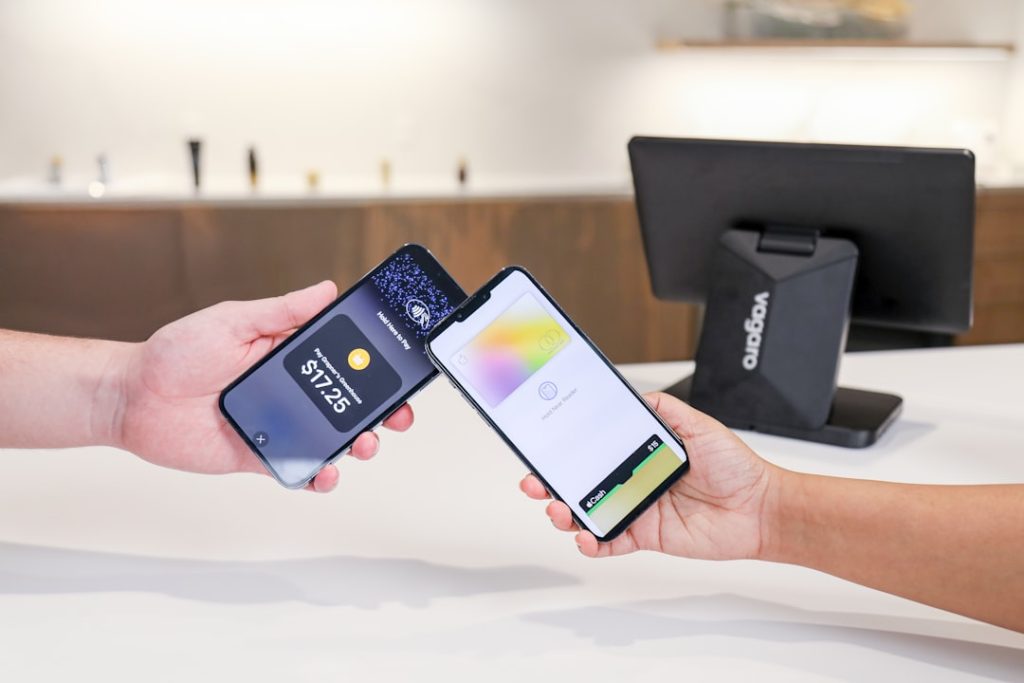
Shopping at Ross Dress for Less is all about the thrill of finding name-brand fashion, home goods, shoes, beauty items, and seasonal décor at lower prices. But when you get to checkout with a cart full of unexpected finds, one practical question matters: can you pay with Apple Pay at Ross?
TLDR: Yes, Ross generally accepts Apple Pay at checkout in its physical stores where contactless payment terminals are available. You can usually pay by holding your iPhone or Apple Watch near the card reader after authenticating with Face ID, Touch ID, or your passcode. Ross does not operate a traditional online shopping checkout, so Apple Pay is mainly relevant for in-store purchases. If you are unsure, look for the contactless symbol at the register or ask the cashier before paying.
Does Ross Take Apple Pay In Store?
Yes, Ross Dress for Less typically accepts Apple Pay in stores. Most modern Ross checkout terminals support contactless payments, which means shoppers can use Apple Pay with a compatible iPhone or Apple Watch. This makes the payment process quick, secure, and convenient, especially if you prefer not to swipe or insert a physical card.
Like many large retail chains, Ross uses payment terminals that are commonly compatible with tap-to-pay methods. Apple Pay works through the same contactless payment technology used by many modern debit and credit cards. If the register has the contactless payment symbol, there is a good chance Apple Pay will work.
That said, store technology can vary. A specific terminal may be temporarily unavailable, a store may have older equipment, or local issues may affect payment options. For that reason, it is always smart to have a backup card or another payment method with you, especially if you are making a larger purchase.
How To Use Apple Pay At Ross Checkout
Using Apple Pay at Ross is simple if you have already added a debit or credit card to your Apple Wallet. The process is similar to paying at grocery stores, pharmacies, fast-food restaurants, and other retailers that accept contactless payments.
- Tell the cashier you are paying by card or simply wait for the payment terminal to activate.
- Open Apple Pay on your iPhone by double-clicking the side button. On older iPhones, you may use the Home button depending on your settings.
- Authenticate the payment with Face ID, Touch ID, or your passcode.
- Hold your iPhone near the card reader until you see a checkmark or hear the confirmation sound.
- Take your receipt or choose any available receipt option offered by the cashier.
If you are using an Apple Watch, double-click the side button and hold the watch near the reader. You do not need to unlock your phone if you are paying with your watch, which can make the process even faster.
Can You Use Apple Pay On The Ross Website?
This is where Ross is a little different from many retailers. Ross does not have a full online shopping store for regular customer purchases. While the company has an official website with store information, investor details, career pages, and general brand content, it does not operate a standard e-commerce checkout where you can browse items and place orders for delivery.
Because of that, you generally cannot use Apple Pay for online Ross purchases in the way you might at stores such as Target, Best Buy, or Nike. Apple Pay at Ross is mostly an in-store payment option.
This also reflects the Ross business model. Ross is an off-price retailer, which means inventory changes frequently and can vary widely from one store to another. One location may have a certain handbag, comforter set, or pair of sneakers, while another store may not. That constantly shifting inventory makes a traditional online catalog more difficult to maintain.
Why Apple Pay Is Useful At Ross
Ross stores can be busy, especially during weekends, holidays, back-to-school season, and big clearance periods. Apple Pay can help speed up checkout because it reduces the need to dig through your wallet, insert a chip card, or handle cash.
- Speed: A tap with your iPhone or Apple Watch can be faster than using a physical card.
- Security: Apple Pay uses tokenization, meaning your actual card number is not shared with the merchant.
- Convenience: You can pay even if your physical wallet is buried in your bag.
- Less contact: You do not need to hand over your card or touch the terminal as much.
For shoppers who visit Ross often, Apple Pay can be especially helpful. The store is known for treasure-hunt shopping, and many customers stop in casually to browse. If you find something great unexpectedly, having Apple Pay ready can save the day.
What Other Payment Methods Does Ross Accept?
Even if Apple Pay is available at most Ross stores, it is helpful to know your alternatives. Ross generally accepts several common payment methods at checkout, though availability may vary by location.
- Major credit cards, such as Visa, Mastercard, American Express, and Discover
- Debit cards, including PIN-based transactions
- Cash
- Ross gift cards
- Contactless payments, including Apple Pay where supported
If you are planning to use a specific payment type, especially a mobile wallet, it is a good idea to confirm at your local store. Payment systems can be updated, replaced, or temporarily offline, and individual store experiences may differ.
What If Apple Pay Does Not Work At Ross?
If your Apple Pay transaction does not go through at Ross, do not panic. The issue may not be with Ross specifically. Contactless payments can fail for several reasons, and most are easy to fix.
First, make sure your iPhone or Apple Watch is unlocked and properly authenticated. Then hold the device close to the contactless symbol on the card reader. Sometimes moving the phone slightly or waiting another second helps the terminal detect it.
If that does not work, check whether your selected card in Apple Wallet is active. A bank may decline a transaction because of fraud protection, insufficient funds, an expired card, or network problems. You can also try switching to another card in your Apple Wallet.
In some cases, the terminal itself may not be accepting tap payments at that moment. If so, the cashier may ask you to insert or swipe a physical card instead.
Does Ross Accept Apple Pay For Returns?
Ross return policies can vary depending on the purchase, receipt, timing, and form of payment. If you paid with Apple Pay, your purchase is still linked to the card used through Apple Wallet. For returns, you may need the receipt and the same device or card associated with the original transaction.
Because Apple Pay uses a device-specific account number rather than your actual card number, the cashier may need you to present the same iPhone, Apple Watch, or payment card connected to that purchase. To make returns smoother, keep your receipt and avoid deleting the card from Apple Wallet until you are sure you will not return the item.

Tips For Paying With Apple Pay At Ross
- Set up Apple Pay before shopping so you are not trying to add a card in the checkout line.
- Charge your device, especially if you plan to rely on your phone instead of a wallet.
- Look for the contactless symbol on the payment terminal.
- Keep a backup payment method in case the terminal is not working.
- Save your receipt for returns, exchanges, or price verification.
Bottom Line
Ross does accept Apple Pay at many store checkouts, making it a convenient option for shoppers who prefer fast, secure, contactless payments. Since Ross does not offer a standard online shopping checkout, Apple Pay is mainly useful when you are shopping in person. For the smoothest experience, make sure your Apple Wallet is set up, watch for the contactless symbol, and keep another payment method handy just in case. Ross shopping may be unpredictable in the best way, but paying with Apple Pay can make the checkout process simple and modern.